If you purchase through links on this page, AIToolBet may earn a commission at no extra cost to you. Our reviews are based on product research and, whenever possible, hands-on testing.
 AI Assistant
Lessons Ready Review
AI instructional planning for classroom-ready K–12 lessons.
Affiliate Disclosure
Quick facts
Lessons Ready at a glance
Setup Time
10 minutes
Pricing
Free and paid plans vary by usage and team size
Free Plan
Check current availability
Platforms
Web, Desktop, Mobile
Best For
Lesson planning, Worksheets, Classroom materials, Teacher productivity, Education content
Overall Rating
4.9 / 5
Overview
What is Lessons Ready?
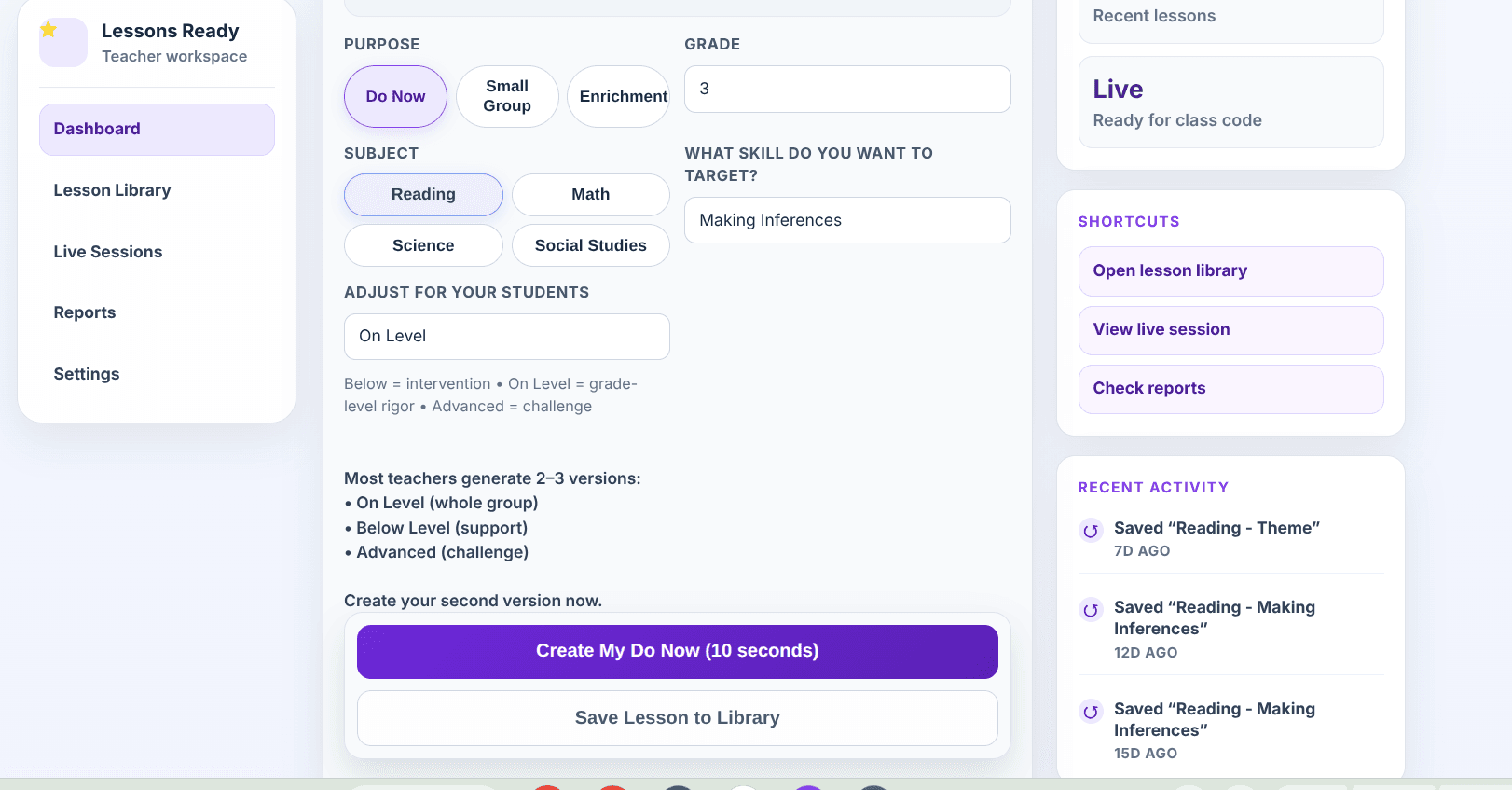
Lessons Ready is an AI lesson planner built specifically for K–12 instructional planning, not a general-purpose writing assistant with a few education prompts added on. After evaluating the workflow end to end, the clearest difference is that it thinks in classroom components: standards-aligned lesson plans, guided practice, independent practice, differentiated instruction, classroom activities, printable resources, assessment questions, teacher scripts, discussion prompts, exit tickets, and presentation slides all belong in the same planning flow.
The platform is much more than a lesson plan generator. A teacher can start with a grade level, subject, standard or learning objective, lesson duration, instructional purpose, and student needs, then produce a sequence that is usable before class starts. For example, a 5th-grade reading teacher who needs a TEKS-aligned lesson before first period can generate the objective, mini-lesson, comprehension questions, vocabulary support, independent practice, exit ticket, and teacher-facing prompts without assembling those pieces across multiple apps.
Lessons Ready appears designed around real classroom workflows by experienced educators: the output is organized around how teachers actually teach, check for understanding, scaffold, reteach, and extend learning. That matters because classroom resources need timing, pacing, student directions, teacher language, and usable practice—not just polished paragraphs about a topic.
The strongest use case is teacher productivity without sacrificing instructional intent. Teachers, interventionists, instructional coaches, assistant principals, principals, curriculum coordinators, and district instructional leaders can use it to reduce planning time, increase consistency, and create materials that still leave room for professional judgment, local curriculum adjustments, and student-specific edits.
Overall Rating
4.9/5
Starting Price
Free and paid plans vary by usage and team size
Free Trial
Check current availability
Best For
Elementary teachers, Middle school teachers, High school teachers, Intervention teachers, SPED support teams, Bilingual classrooms, Instructional coaches, Assistant principals and principals, Curriculum coordinators, District instructional leaders.
Features
How the key features work in practice
AI Lesson Generator
What it does
Creates classroom-ready lessons from grade level, subject, learning objective, instructional purpose, duration, intervention or enrichment focus, and accommodations. Outputs include standards-aligned objectives, teacher scripts, guided practice, independent practice, discussion prompts, checks for understanding, and exit tickets rather than generic AI text.
Live Mode
What it does
Turns generated instructional content into a teacher-led live classroom experience similar in feel to Blooket or Kahoot, but centered on teacher-created lesson content. Teachers can pace questions, present prompts to the whole class, collect participation, pause for discussion, and teach directly from the generated materials without juggling multiple applications.
Built-in Student Accommodations
What it does
Supports accessibility and differentiation with side-by-side English and Spanish text, bilingual instructional supports, text-to-speech compatibility, dyslexia-friendly font options, line reader support, answer elimination, highlighting tools, glossary support, visual accessibility features, and simplified presentation options.
Differentiated Instruction
What it does
Adapts lessons for below-level, on-level, and advanced learners through different question complexity, scaffolded directions, intervention supports, enrichment tasks, vocabulary help, and extension prompts.
Presentation Generator
What it does
Generates teacher presentation slides with lesson flow, teacher prompts, discussion questions, guided instruction, visual pacing, and student-facing directions so teachers can move from planning to delivery quickly.
Printable Classroom Resources
What it does
Creates worksheets, exit tickets, bell ringers, Do Nows, vocabulary practice, comprehension questions, independent practice, small-group tasks, and other classroom resources teachers can print or adapt.
Pros & Cons
A balanced Lessons Ready review
Pros
- Purpose-built for K–12 educators rather than generic AI writing
- Saves significant lesson planning time while preserving teacher review and editing
- Live Mode supports real-time classroom delivery from teacher-created instructional content
- Creates bilingual classroom resources, including side-by-side English and Spanish support
- Built-in accessibility tools help English learners, struggling readers, and students with accommodations
- Strong differentiated instruction workflow for intervention, core instruction, and enrichment
- Generates printable worksheets, exit tickets, bell ringers, Do Nows, and practice materials
- Creates teacher presentation slides with prompts, discussion questions, and classroom flow
- Supports standards-aligned and TEKS lesson plans workflows
- Teacher-friendly interface for classroom teachers, coaches, and administrators
Cons
- Generated lessons should still be reviewed for accuracy, rigor, pacing, and classroom fit
- Districts may need to adjust lessons to match local curriculum maps, assessment language, or approved resources
- Internet access is required for planning, presentation, and Live Mode workflows
- Advanced customization still benefits from teacher editing, especially for highly specific texts, labs, or district templates
- It is not a full learning management system and should be paired with existing gradebook or LMS tools when needed
Editorial rating
Lessons Ready rating breakdown
Ease of Use
4.7 / 5
Features
4.3 / 5
AI Quality
4.3 / 5
Templates
4.0 / 5
Automation
4.5 / 5
Pricing
4.5 / 5
Support
4.1 / 5
Overall
4.9 / 5
Pricing
Lessons Ready pricing plans
Free
$0 or limited access
Best for teachers testing lesson-planning workflows.
- Lessons Ready core workflow access
- Plan limits vary by usage and billing option
- Review current terms before purchasing
Pro
Paid plan
Best for educators creating lessons regularly.
- Lessons Ready core workflow access
- Plan limits vary by usage and billing option
- Review current terms before purchasing
School
Custom Pricing
Best for departments or schools standardizing lesson creation.
- Lessons Ready core workflow access
- Plan limits vary by usage and billing option
- Review current terms before purchasing
District
Custom Pricing
Best for district-wide purchasing and support.
- Lessons Ready core workflow access
- Plan limits vary by usage and billing option
- Review current terms before purchasing
Best fit
Who should use Lessons Ready
Classroom teachers
Best for teachers who need lesson planning software that produces usable objectives, teacher scripts, guided practice, independent practice, and exit tickets quickly.
Interventionists and SPED support
Useful when students need reteaching, smaller steps, accessibility supports, answer elimination, text supports, and differentiated practice.
Bilingual and English learner classrooms
A strong fit when side-by-side English and Spanish resources, bilingual supports, glossary help, and simplified presentation options are part of daily instruction.
Instructional coaches
Helpful for modeling lesson structure, creating exemplar materials, and supporting new teachers without building every resource from scratch.
School and district leaders
Useful for improving instructional consistency, substitute planning, walkthrough preparation, and standards-aligned planning expectations across teams.
Not a fit
Who should skip Lessons Ready
Teachers who cannot review AI output
Lessons Ready speeds planning, but teachers still need to verify accuracy, standards alignment, rigor, and appropriateness for their students.
Schools needing a full LMS replacement
It is best understood as instructional planning and classroom resource software, not a complete gradebook, LMS, or student information system.
Highly locked curriculum environments
If every lesson must follow a fixed district script with no teacher adaptation, the platform may be more useful for supplemental practice than core planning.
Use cases
Real-world ways to use Lessons Ready
A 5th-grade reading teacher needs a TEKS-aligned lesson before first period with vocabulary support, discussion prompts, independent practice, and an exit ticket.
Scenario
A 5th-grade reading teacher needs a TEKS-aligned lesson before first period with vocabulary support, discussion prompts, independent practice, and an exit ticket.
Problem
The starting material is scattered, incomplete, or too time-consuming to organize manually.
How Lessons Ready solves it
A 5th-grade reading teacher needs a TEKS-aligned lesson before first period with vocabulary support, discussion prompts, independent practice, and an exit ticket.
Expected outcome
Expected outcome: a more structured working draft that a subject-matter expert can refine.
A middle school intervention teacher needs differentiated passages and scaffolded questions for below-level readers while keeping the same core objective.
Scenario
A middle school intervention teacher needs differentiated passages and scaffolded questions for below-level readers while keeping the same core objective.
Problem
The starting material is scattered, incomplete, or too time-consuming to organize manually.
How Lessons Ready solves it
A middle school intervention teacher needs differentiated passages and scaffolded questions for below-level readers while keeping the same core objective.
Expected outcome
Expected outcome: a more structured working draft that a subject-matter expert can refine.
A bilingual classroom requires English and Spanish resources side-by-side so students can access the same concept without switching documents.
Scenario
A bilingual classroom requires English and Spanish resources side-by-side so students can access the same concept without switching documents.
Problem
The starting material is scattered, incomplete, or too time-consuming to organize manually.
How Lessons Ready solves it
A bilingual classroom requires English and Spanish resources side-by-side so students can access the same concept without switching documents.
Expected outcome
Expected outcome: a more structured working draft that a subject-matter expert can refine.
An instructional coach needs a model lesson, teacher prompts, and presentation slides for a planning meeting with a new teacher.
Scenario
An instructional coach needs a model lesson, teacher prompts, and presentation slides for a planning meeting with a new teacher.
Problem
The starting material is scattered, incomplete, or too time-consuming to organize manually.
How Lessons Ready solves it
An instructional coach needs a model lesson, teacher prompts, and presentation slides for a planning meeting with a new teacher.
Expected outcome
Expected outcome: a more structured working draft that a subject-matter expert can refine.
A principal needs a clear model lesson during a walkthrough or coaching conversation to discuss objective alignment, questioning, and checks for understanding.
Scenario
A principal needs a clear model lesson during a walkthrough or coaching conversation to discuss objective alignment, questioning, and checks for understanding.
Problem
The starting material is scattered, incomplete, or too time-consuming to organize manually.
How Lessons Ready solves it
A principal needs a clear model lesson during a walkthrough or coaching conversation to discuss objective alignment, questioning, and checks for understanding.
Expected outcome
Expected outcome: a more structured working draft that a subject-matter expert can refine.
A substitute needs printable classroom resources, a simple lesson flow, and student-facing directions that are easier to execute than a long narrative plan.
Scenario
A substitute needs printable classroom resources, a simple lesson flow, and student-facing directions that are easier to execute than a long narrative plan.
Problem
The starting material is scattered, incomplete, or too time-consuming to organize manually.
How Lessons Ready solves it
A substitute needs printable classroom resources, a simple lesson flow, and student-facing directions that are easier to execute than a long narrative plan.
Expected outcome
Expected outcome: a more structured working draft that a subject-matter expert can refine.
If these workflows match work you do every week, check Lessons Ready's current plans and limits before choosing a paid tier. Occasional users should start with the free option when available.
Alternatives
Lessons Ready alternatives to compare
M
MagicSchool AI
Compare MagicSchool AI with Lessons Ready before choosing a software tool.
Comparison onlyB
Brisk Teaching
Compare Brisk Teaching with Lessons Ready before choosing a software tool.
Comparison only
G
Google Classroom
Compare Google Classroom with Lessons Ready before choosing a software tool.
Comparison only
ChatGPT
Choose ChatGPT when a general-purpose conversational assistant is preferable to a lesson-specific teacher workflow.
Read ReviewComparison
Lessons Ready comparison table
| Feature | Lessons Ready | MagicSchool AI | Brisk Teaching | Canva | Google Classroom |
|---|---|---|---|---|---|
| Primary strength | Classroom-ready AI instructional planning | Teacher AI tools and prompts | In-document teacher workflow support | Design and visual creation | LMS distribution and class management |
| Best for | Lesson plans, Live Mode, differentiation, bilingual accommodations, printables, teacher presentation slides | Broad AI teacher assistance | Feedback, reading supports, and Google-integrated workflows | Posters, slides, visuals, and classroom design assets | Assignments, announcements, and LMS organization |
| Classroom delivery | Live Mode for teacher-paced AI classroom instruction | Varies by tool workflow | Usually used alongside other delivery tools | Presentation mode, not lesson-specific Live Mode | Assignment and stream delivery |
| Accessibility support | Bilingual supports, text-to-speech compatibility, dyslexia-friendly font, line reader, elimination, highlight, glossary, simplified presentation | Depends on selected tool | Depends on document and extension context | Visual accessibility depends on teacher design | Depends on district setup and add-ons |
| When to choose it | Choose Lessons Ready when instructional planning, differentiated instruction, TEKS lesson plans, printables, slides, and Live Mode matter most. | Choose MagicSchool AI for broad teacher AI utilities. | Choose Brisk Teaching for browser/document-based teacher assistance. | Choose Canva for visual design and polished classroom graphics. | Choose Google Classroom for LMS workflows, assignment collection, and class communication. |
FAQ
Frequently asked questions
What is Lessons Ready best for?
Lessons Ready is best for K–12 instructional planning: AI lesson plans, TEKS lesson plans, differentiated instruction, teacher presentation slides, printable classroom resources, Live Mode delivery, and accommodations for diverse learners.
Does Lessons Ready support bilingual classrooms?
Yes. Lessons Ready is designed for bilingual classroom needs with supports such as side-by-side English and Spanish text, bilingual instructional scaffolds, glossary support, and simplified presentation options.
Can Lessons Ready create side-by-side English and Spanish lessons?
Yes. Teachers can use Lessons Ready to create resources that present English and Spanish text side by side, which is especially helpful for English learners, bilingual classrooms, and families reviewing materials at home.
Does Lessons Ready work with TEKS?
Lessons Ready is a strong fit for TEKS lesson plans because teachers can plan around standards, objectives, instructional purpose, and grade-level expectations. As with any AI lesson planner, teachers should verify final alignment against district curriculum documents.
Can it generate intervention lessons?
Yes. Teachers can specify intervention, reteaching, or below-level support and generate scaffolded explanations, simplified practice, targeted questioning, and checks for understanding.
Can it create presentation slides?
Yes. Lessons Ready can generate teacher presentation slides with lesson flow, prompts, discussion questions, student-facing directions, and visual pacing for whole-class instruction.
Does it support accommodations?
Yes. Accommodation-oriented supports include bilingual text, text-to-speech compatibility, dyslexia-friendly font options, line reader support, answer elimination, highlighting tools, glossary support, visual accessibility features, and simplified presentation options.
Can districts purchase licenses?
Lessons Ready offers school and district-oriented purchasing paths, but buyers should confirm current plan names, pricing, rostering, data policies, and support terms directly with the company.
Can teachers edit generated lessons?
Yes. The best workflow is to treat the generated lesson as a strong classroom-ready draft, then adjust examples, pacing, vocabulary, local curriculum language, and student-specific supports.
Is Live Mode similar to Blooket or Kahoot?
Live Mode is similar in that it supports interactive whole-class participation and teacher-paced delivery, but it is built around teacher-created instructional content rather than game play alone.
What makes Lessons Ready different from ChatGPT?
ChatGPT can draft education content, but Lessons Ready is structured as a teacher AI assistant for instructional planning. It organizes outputs around lessons, practice, accommodations, printables, slides, and Live Mode delivery instead of requiring teachers to design the entire workflow through prompts.
How quickly can a complete lesson be generated?
A complete lesson can typically be generated in minutes once the teacher has the grade level, objective, lesson purpose, duration, and accommodation needs ready. Teacher review and customization add time but are still much faster than starting from a blank page.
How much does Lessons Ready cost?
Review the current Lessons Ready pricing page because plan names, limits, school licenses, district licenses, and promotions can change.
Is Lessons Ready worth it in 2026?
Lessons Ready is worth shortlisting if your main need is faster instructional planning, classroom-ready resources, differentiated instruction, bilingual supports, presentation generation, and AI classroom instruction through Live Mode.
Teaching workflows
🎓 Classroom & Teaching Ideas for Lessons Ready
Complete Monday lesson system
Best for
Teachers who want one teachable day instead of disconnected AI worksheets.
How Lessons Ready helps
Lessons Ready is used for its strongest classroom job: complete the product-specific task named in its review facts.
Teacher check
Confirm standards, accommodations, reading level, and any school privacy rules before using the materials with students.
Workflow steps
- Bell ringer: create a 5-minute warm-up tied to yesterday’s misconception.
- Mini lesson: draft direct instruction, examples, and two checks for understanding.
- Small group: create reteach, on-level, and extension tasks.
- Exit ticket: write three questions that reveal the exact skill gap.
- Homework and parent note: prepare a short practice task plus plain-language family communication.
Unit resource pack
What it creates
Vocabulary sheets, anchor charts, guided notes, quiz banks, rubrics, substitute plans, and remediation tasks around one unit.
Why it works
A full pack saves more time than one-off prompts because every activity uses the same objective, examples, and vocabulary.
Quality control
Use teacher judgment to remove weak distractors, fix cultural context, and align activities to actual classroom pacing.
Intervention loop
Scenario
After an exit ticket, several students miss the same subskill.
Workflow
Convert wrong answers into a reteach script, guided practice, independent practice, and a quick parent-friendly update.
Outcome
Teachers get a same-week support plan instead of waiting until the next unit test exposes the gap.
Internal links
🔗 Works Even Better With
ChatGPT
ChatGPT: Plan and document the work before another tool builds, publishes, or automates it. after Lessons Ready handles its own job (complete one confirmed product-specific job.). Writes requirements, documentation, user stories, technical specifications, customer scripts, and source-grounded drafts for human review.
NotebookLM
NotebookLM: Complete one confirmed product-specific job. after Lessons Ready handles its own job (complete one confirmed product-specific job.). Perform the specific product role confirmed by the review facts; do not describe it with generic drafting, planning, or workflow language.
Starter stack
⭐ Recommended Starter Stack
1.Lessons Ready— Use the product for the narrow job its review facts explicitly support, then verify the output before selling or publishing it.
2.ChatGPT— Turn one messy customer problem into requirements, an outline, a checklist, a script, or a technical specification.
3.NotebookLM— Use the product for the narrow job its review facts explicitly support, then verify the output before selling or publishing it.
Lessons Ready operate: complete one confirmed product-specific job. → ChatGPT plan: plan and document the work before another tool builds, publishes, or automates it. → NotebookLM operate: complete one confirmed product-specific job.. This stack answers the real sequence: build first with Lessons Ready (complete one confirmed product-specific job.), refine with a tool that owns polish or code quality, publish with a hosting or commerce tool, market with lead capture, and automate only after the manual path works.
Roadmap
📈 Realistic Growth Path
- 1Use the product for the narrow job its review facts explicitly support, then verify the output before selling or publishing it.
- 2Sell or deliver the first paid version and document every revision request.
- 3Publish a landing page, portfolio example, checkout page, or client portal so the offer has a permanent home.
- 4Add email capture, onboarding, analytics, and a repeatable QA checklist.
- 5Add only the next tool needed for the missing step, such as publishing, payment, email capture, visual polish, or client handoff.
- 6Hire contractors or assistants only after the process is documented well enough to delegate.
Best fit
🎯 Best Fit
Teachers
Ecommerce
Final verdict
Should you use Lessons Ready in 2026?
Overall Rating
4.9
out of 5
Our recommendation
Lessons Ready is one of the strongest fits for educators who want an AI lesson planner that behaves like instructional planning software rather than a generic chatbot. Its best value comes from combining standards-aligned lesson plans, differentiated instruction, bilingual accommodations, printable classroom resources, teacher presentation slides, and Live Mode delivery in one workflow. Teachers and districts should still review generated materials for local curriculum alignment, but Lessons Ready is a compelling option for reducing planning time while improving day-to-day instructional consistency.
Best for: Elementary teachers, Middle school teachers, High school teachers, Intervention teachers, SPED support teams, Bilingual classrooms, Instructional coaches, Assistant principals and principals, Curriculum coordinators, District instructional leaders.
Compare with
Compare Lessons Ready against similar tools
Lessons Ready vs ChatGPT
Compare pricing, features, pros, cons, and best-fit users.
Compare Now →

Lessons Ready vs NotebookLM
Compare pricing, features, pros, cons, and best-fit users.
Compare Now →

Lessons Ready vs SchoolAI
Compare pricing, features, pros, cons, and best-fit users.
Compare Now →
Lessons Ready vs Canva for Education AI
Compare pricing, features, pros, cons, and best-fit users.
Compare Now →
Lessons Ready vs Khanmigo
Compare pricing, features, pros, cons, and best-fit users.
Compare Now →
Related reviews
More software reviews to compare
ChatGPT
A leading AI assistant for writing, coding, research, analysis, brainstorming, and everyday productivity
Read Review →
NotebookLM
Source-grounded research assistance
Read Review →
SchoolAI
Managed ai classroom experiences
Read Review →
Canva for Education AI
Ai-assisted educational design
Read Review →
Khanmigo
Guided learning and teaching support
Read Review →